A smart home sounds futuristic and complicated, but in 2026 the technology has matured to the point where anyone can set one up over a weekend without any technical expertise. The right combination of devices can save you money on energy bills, make your home more secure, and eliminate dozens of small daily inconveniences. This guide covers everything you need to know to go from a completely “dumb” home to a fully connected smart home, step by step.
What Is a Smart Home?
A smart home uses internet-connected devices to automate and remotely control functions like lighting, temperature, security, and entertainment. These devices communicate with each other and with you through a central hub, voice assistant, or smartphone app.
The key benefit is not just remote control — it is automation. A well-configured smart home does not require you to constantly bark commands at a speaker. Instead, lights turn on when you walk into a room, the thermostat adjusts based on your schedule, and the security system arms itself when you leave. The technology fades into the background and your home simply works better.
Choosing Your Ecosystem
The most important decision you will make is choosing which ecosystem to build around. Your ecosystem determines which devices work together seamlessly and which voice assistant controls everything.
Amazon Alexa
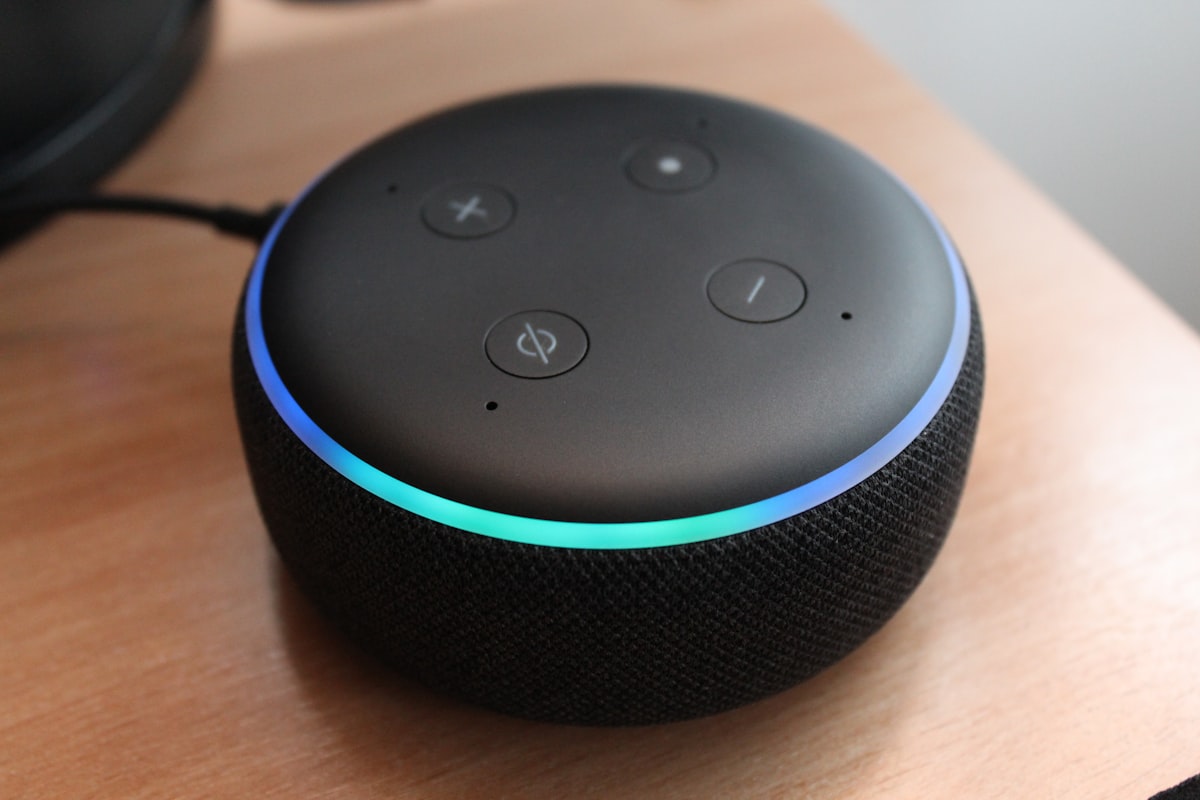
Amazon’s ecosystem is the largest, with over 140,000 compatible devices. Alexa runs on Echo speakers and displays, Fire TV devices, and a growing range of third-party hardware.
Strengths:
- Widest device compatibility of any ecosystem
- Excellent smart speaker lineup at every price point
- Strong third-party skill library
- Good integration with Ring security products and Amazon services
Weaknesses:
- Privacy concerns due to Amazon’s data practices
- Skills can feel clunky compared to native integrations
- The app interface can be overwhelming with so many features
Google Home
Google’s ecosystem runs on Nest speakers and displays and integrates deeply with Google services like Calendar, Maps, and YouTube.
Strengths:
- Best natural language understanding for voice commands
- Tight integration with Google services (Calendar, YouTube, Maps)
- Excellent smart displays with the Nest Hub line
- Strong integration with Chromecast for media
Weaknesses:
- Smaller compatible device library than Alexa
- Google has a history of discontinuing products and services
- Some features require a Nest Aware subscription
Apple HomeKit
Apple’s smart home platform prioritizes privacy and simplicity. It works through the Home app on iPhone, iPad, Mac, and Apple Watch, with Siri as the voice assistant.
Strengths:
- Strongest privacy protections — data processed locally whenever possible
- Elegant, intuitive interface through the Home app
- Deep integration with iPhone and Apple Watch
- HomeKit Secure Video stores camera footage in iCloud with end-to-end encryption
Weaknesses:
- Smallest compatible device library
- Siri is less capable than Alexa or Google Assistant for smart home control
- Requires Apple devices, which limits household members without iPhones
- HomePod speakers are more expensive than competitors
Our Recommendation
For most households, Google Home or Amazon Alexa offer the best balance of compatibility, features, and price. If your household is fully invested in Apple products and you prioritize privacy above all else, HomeKit is excellent. The good news is that the Matter protocol (more on that below) is increasingly making cross-ecosystem compatibility a non-issue.
Smart Speakers and Displays: Your Command Center
A smart speaker or smart display serves as the central interface for your smart home. It is how you issue voice commands, get information, and control devices hands-free.
Best Smart Speakers in 2026
- Amazon Echo (5th Gen) — $99. The best all-around smart speaker for Alexa users, with excellent sound quality and a built-in temperature sensor.
- Google Nest Audio — $99. Impressive sound quality for its size, with Google Assistant’s superior natural language processing.
- Apple HomePod (3rd Gen) — $299. Premium sound quality with spatial audio and the deepest Siri integration, plus a built-in Matter hub.
- Amazon Echo Pop — $39. A budget option that delivers core smart speaker functionality at a fraction of the price.
Best Smart Displays
- Amazon Echo Show 10 — $249. A motorized display that follows you around the room, excellent for video calls and kitchen use.
- Google Nest Hub Max — $229. A 10-inch display with a built-in camera, great for video calls and as a digital photo frame.
- Google Nest Hub (2nd Gen) — $99. A compact bedside display with sleep tracking via radar — no camera, which many prefer for the bedroom.
Placement Tips
- Place at least one speaker in the kitchen, living room, and bedroom for whole-home voice coverage.
- Keep speakers away from windows and exterior walls to avoid accidentally activating neighbors’ devices.
- Smart displays work best in the kitchen (for recipes and timers) and on the nightstand (for alarms and sleep tracking).
Smart Lighting: The Best Starting Point
If you are going to start with one category of smart home device, make it lighting. Smart lights deliver immediate, tangible quality-of-life improvements and are among the easiest devices to set up.
Smart Bulbs vs. Smart Switches
You have two main options for smart lighting:
Smart bulbs replace your existing bulbs with Wi-Fi or Zigbee-connected bulbs that can be controlled via app or voice.
- Pros: No wiring required, color-changing options, individual bulb control
- Cons: Must stay powered at the wall switch (turning off the wall switch kills the smart functionality), more expensive per-point-of-light
Smart switches replace your existing wall switches with connected versions that control whatever bulbs are installed in the fixture.
- Pros: Work with any bulb, maintain normal switch functionality, more cost-effective for multi-bulb fixtures
- Cons: Require basic wiring knowledge or an electrician, no color-changing capability unless paired with smart bulbs
Recommended Smart Lighting Products
- Philips Hue Starter Kit — $129 for a bridge and 3 bulbs. The gold standard for smart bulbs, with the widest range of bulbs and accessories. Requires the Hue Bridge hub.
- Lutron Caseta Switches — $65 per switch with remote. The most reliable smart switches available, using their own wireless protocol for interference-free performance. Requires the Caseta Smart Bridge.
- LIFX Bulbs — $30-50 per bulb. Wi-Fi-connected bulbs that do not require a hub, with vibrant colors and high brightness.
- TP-Link Kasa Smart Switches — $20-25 per switch. Affordable Wi-Fi switches that work without a separate hub.
Automation Ideas for Smart Lighting
Once your lights are connected, set up these automations:
- Sunrise simulation — Gradually brighten bedroom lights over 30 minutes before your alarm
- Motion-activated hallway lights — Use a motion sensor to turn on hallway lights at night at a dim, warm setting
- Away mode — Randomly turn lights on and off when you are away to make the house look occupied
- Movie time — A single voice command dims all living room lights to 10%
- Bedtime routine — At a set time, all lights in the house gradually dim and turn off except a reading light
Smart Thermostats: Comfort Meets Savings
A smart thermostat is one of the few smart home devices that can pay for itself through energy savings. The U.S. Department of Energy estimates that properly using a programmable thermostat can save 10-15% on heating and cooling costs annually, making it one of the highest-impact home energy efficiency upgrades you can make.
Top Smart Thermostats
- Google Nest Learning Thermostat (4th Gen) — $279. Learns your preferences and schedule automatically, then optimizes heating and cooling accordingly. The new model features a sleek borderless display.
- Ecobee Smart Thermostat Premium — $249. Includes a remote room sensor, built-in Alexa speaker, and air quality monitoring. Excellent for homes with hot or cold spots.
- Amazon Smart Thermostat — $79. A budget option made by Honeywell for Amazon, with basic smart features and Alexa integration at an unbeatable price.
Installation Considerations
Most smart thermostats can be self-installed in 30-45 minutes if your home has a C-wire (common wire) providing constant power to the thermostat. Check your current thermostat wiring before purchasing — if you only have two wires, you may need an adapter or a model that works without a C-wire.
If you are not comfortable working with wiring, hire an HVAC technician. Installation typically costs $75-150 and ensures everything is set up correctly.
Maximizing Energy Savings
- Use geofencing — Most smart thermostats can detect when your phone leaves a set radius and automatically switch to an energy-saving mode.
- Set schedules — Program lower temperatures at night and when you are at work. Every degree you lower the thermostat during sleeping hours saves approximately 1% on your heating bill.
- Use remote sensors — If your thermostat is in the hallway but you spend most of your time in the living room, a remote sensor ensures the room you are actually in reaches the target temperature.
- Review energy reports — All major smart thermostats provide monthly energy usage reports. Use them to identify patterns and further optimize your settings.
Smart Security: Protecting Your Home
Smart security devices provide peace of mind through real-time monitoring, instant alerts, and the ability to check on your home from anywhere.
Video Doorbells
A video doorbell lets you see and speak with whoever is at your door, whether you are home or halfway around the world.
- Ring Video Doorbell 4 — $199. The most popular video doorbell, with reliable performance and a massive ecosystem of Ring accessories.
- Google Nest Doorbell (Wired) — $179. Offers 24/7 continuous recording (unlike battery models) and excellent person, package, and animal detection with a Nest Aware subscription.
- Arlo Essential Video Doorbell — $149. A solid option that works with any ecosystem and offers a wide viewing angle.
Security Cameras
- Ring Indoor Cam (2nd Gen) — $59. An affordable indoor camera with good image quality and Alexa integration.
- Google Nest Cam (Outdoor) — $179. Weather-resistant with intelligent alerts that distinguish between people, animals, and vehicles.
- Arlo Pro 5S — $249. A wireless, weather-resistant camera with excellent image quality and compatibility across all major ecosystems.
Smart Locks
- August Wi-Fi Smart Lock (4th Gen) — $229. Installs on the inside of your existing deadbolt, preserving the exterior appearance of your door. Auto-unlock detects your phone and unlocks as you approach.
- Yale Assure Lock 2 — $249. A full deadbolt replacement with a keypad, available with modules for any ecosystem. Clean design and reliable performance.
- Schlage Encode Plus — $299. The first lock with Apple Home Key support, allowing you to unlock with a tap of your iPhone or Apple Watch.
DIY vs. Professional Monitoring
You have two options for security monitoring:
Self-monitoring (free): You receive alerts on your phone and decide how to respond. This works well for most situations and costs nothing beyond the device price.
Professional monitoring ($10-30/month): A monitoring center receives alerts and can dispatch emergency services on your behalf. Services like Ring Protect Pro ($20/month) and ADT ($28/month) provide 24/7 professional monitoring. This is worth considering if you travel frequently or want the assurance that someone will respond even if you miss an alert.
Understanding Smart Home Protocols
Smart home devices communicate using various wireless protocols. Understanding the basics helps you make better purchasing decisions.
Wi-Fi
Most smart home devices connect via your existing Wi-Fi network. This is convenient because no additional hub is required, but it can overwhelm your router if you add dozens of devices. A good mesh Wi-Fi system (like eero, Google Nest WiFi, or TP-Link Deco) helps manage the load.
Zigbee and Z-Wave
These low-power mesh networking protocols are designed specifically for smart home devices. They use less energy than Wi-Fi, do not congest your network, and create a mesh network where each device extends the range. The downside is that they require a compatible hub (like the Aeotec Smart Home Hub or Amazon Echo with built-in Zigbee).
Matter
Matter is the most significant development in smart home technology in years. Backed by Apple, Google, Amazon, and Samsung, Matter is a unified standard that allows devices from different manufacturers and ecosystems to work together seamlessly. A Matter-compatible light bulb works with Alexa, Google Home, and HomeKit without separate setup for each.
In 2026, most new smart home devices support Matter, and it should be a key consideration when purchasing new devices. Buying Matter-compatible devices future-proofs your smart home against ecosystem changes and ensures maximum flexibility.
Thread
Thread is a low-power mesh networking protocol designed to work with Matter. Thread-enabled devices communicate directly with each other (without going through a cloud server), reducing latency and improving reliability. Many newer devices from Apple, Google, and Eve support Thread, and it is increasingly becoming the preferred underlying protocol for Matter devices.
Building Your Smart Home: A Practical Budget Guide
Here is a realistic breakdown for setting up a smart home at different budget levels:
Budget Setup ($200-400)
- 1 smart speaker (Echo Pop or Nest Mini — $40-50)
- 4 smart bulbs (LIFX Mini — $100)
- 1 smart plug 4-pack (TP-Link Kasa — $30)
- 1 smart thermostat (Amazon Smart Thermostat — $79)
This gets you voice-controlled lights, automated heating and cooling, and smart plug control for lamps and appliances.
Mid-Range Setup ($600-1,000)
Everything in the budget setup plus:
- 1 smart display (Nest Hub 2nd Gen — $99)
- 1 video doorbell (Ring Video Doorbell 4 — $199)
- 2 smart switches (TP-Link Kasa — $50)
- 1 smart lock (August Wi-Fi — $229)
This adds visual control, front door security, and keyless entry.
Premium Setup ($1,500-2,500)
Everything in the mid-range setup plus:
- Philips Hue system with bridge and 10+ bulbs ($350)
- Google Nest Learning Thermostat or Ecobee Premium ($250-280)
- 2 security cameras (Arlo Pro 5S — $500)
- Additional smart speakers for whole-home coverage ($200)
- Smart smoke and CO detectors (Nest Protect 3-pack — $350)
This delivers comprehensive home automation, security, and safety monitoring.
Frequently Asked Questions
Do I need strong technical skills to set up a smart home?
Not at all. Modern smart home devices are designed for consumer-level setup. Most involve downloading an app, scanning a QR code, and following on-screen instructions. The most technically demanding task you might encounter is installing a smart switch, which requires basic knowledge of household wiring. If you are uncomfortable with that, any licensed electrician can install smart switches quickly and inexpensively. Everything else — bulbs, speakers, cameras, thermostats — is genuinely plug-and-play. And if you do enjoy tinkering, running your own automation hub is one of the most popular Raspberry Pi projects around.
Will smart home devices slow down my Wi-Fi?
They can if you add many Wi-Fi-connected devices to an aging router. Each smart bulb, plug, and camera takes up a connection on your network. If you plan to add more than 15-20 Wi-Fi devices, invest in a mesh Wi-Fi system that can handle the load. Alternatively, choose devices that use Zigbee, Z-Wave, or Thread protocols, which operate on separate radio frequencies and do not affect your Wi-Fi performance at all.
Are smart home devices secure from hackers?
Security has improved significantly, but no connected device is perfectly immune. To protect yourself, always change default passwords, enable two-factor authentication on your smart home apps, keep device firmware updated, and use a router with WPA3 encryption — our home network security guide walks through locking down your router and segmenting IoT devices. Avoid cheap, no-name devices from unknown manufacturers, as they often have poor security practices. Choosing devices from established brands like Google, Apple, Amazon, and Ring ensures you receive regular security patches.
Can I take my smart home devices with me when I move?
Most smart home devices are portable. Smart bulbs, speakers, cameras, and plugs simply unplug and move with you. Smart switches and thermostats can also be removed, but you will need to reinstall the original switches and thermostat before leaving (check your lease or homeowner agreement). Smart locks typically need to be removed as well, with the original hardware reinstalled. Budget 30-60 minutes to reset your smart home devices before moving out and the same to set them up in your new place.